IKIT Usecases
The IKIT can help you speed up or test the development against the integration system:
- Use http(s) endpoints without the need to use client certificates
- Proxy functionality: See directly what you are sending to the integration system and receiving, including basic validation, this is available for SOAP webservices and ATNA Audit Events
- Use the IdP Assertion from IKIT that you can get a XUA token from the STS (secure token service) to do document queries or publish documents
- Use the TCU Assertion from IKIT that you can get a XUA token from the STS (secure token service) to publish a document via a technical user
http(s) endpoints without the need to use client certificates and proxy functionality
Adapt your webservice endpoints to the one provided in [eprik-config.md]. This allows you to use http or https endpoints without the need to use client certificates from the beginning and you can verify the if the different webservices are working.
To execute the examples you can either use curl or use the provided .http files if you have VSCode with the REST Client extension installed.
Demographics Query for WEINMANN:
curl --request POST \
  --url https://ikit.cara.ch/dep/proxy/cara/int/UPIProxy/services/PIXPDQV3ManagerService \
  --header 'content-type: application/soap+xml;charset=UTF-8' \
  --header 'user-agent: vscode-restclient' \
  --data '<soap:Envelope xmlns:soap="http://www.w3.org/2003/05/soap-envelope"><soap:Header><Action soap:mustUnderstand="true" xmlns="http://www.w3.org/2005/08/addressing">urn:hl7-org:v3:PRPA_IN201305UV02</Action><MessageID xmlns="http://www.w3.org/2005/08/addressing">urn:uuid:88c76963-f467-49e2-a2c0-a772a4685ee3</MessageID><To xmlns="http://www.w3.org/2005/08/addressing">https://ikit.cara.ch/dep/proxy/cara/int/UPIProxy/services/PIXPDQV3ManagerService</To><ReplyTo xmlns="http://www.w3.org/2005/08/addressing"><Address>http://www.w3.org/2005/08/addressing/anonymous</Address></ReplyTo></soap:Header><soap:Body><PRPA_IN201305UV02 xmlns="urn:hl7-org:v3" ITSVersion="XML_1.0"><id extension="1659464609650" root="1.3.6.1.4.1.21367.2017.2.1.104"/><creationTime value="20220822083241"/><interactionId extension="PRPA_IN201305UV02" root="2.16.840.1.113883.1.6"/><processingCode code="T"/><processingModeCode code="T"/><acceptAckCode code="AL"/><receiver typeCode="RCV"><device classCode="DEV" determinerCode="INSTANCE"><id root="2.16.756.5.30.1.177.2.2.1.1.3"/></device></receiver><sender typeCode="SND"><device classCode="DEV" determinerCode="INSTANCE"><id root="2.16.756.5.30.1.145.1.1"/></device></sender><controlActProcess classCode="CACT" moodCode="EVN"><code code="PRPA_TE201305UV02" displayName="2.16.840.1.113883.1.6"/><queryByParameter><queryId extension="1659464609651" root="1.3.6.1.4.1.21367.2017.2.1.104"/><statusCode code="new"/><responseModalityCode code="R"/><responsePriorityCode code="I"/><parameterList><livingSubjectName><value use="SRCH"><family>WEINMANN</family></value><semanticsText>LivingSubject.name</semanticsText></livingSubjectName></parameterList></queryByParameter></controlActProcess></PRPA_IN201305UV02></soap:Body></soap:Envelope>'
Proxy functionality
You can then search for the request on ikit, it shows ALL requests/responses which happened today. You can also adjust the filter criteria. If you click on 'show' you see the details of the request:
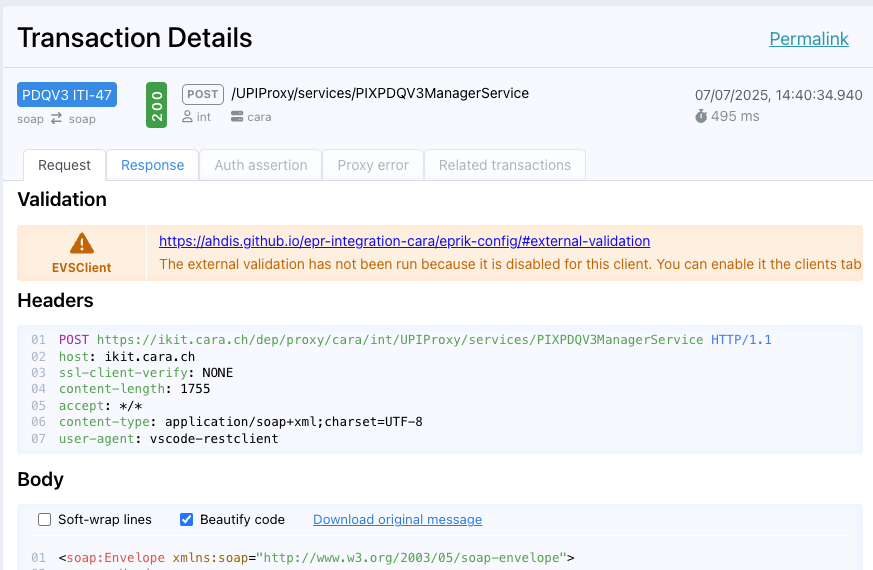
If you click on 'Beautify code' it will pretty print the request / response (do not this for assertions which are signed when you wan't to reuse them). If you click on the 'Response' tab you get the response message. If an Assertion was provided you would see it in the 'Auth Assertion tab'. If the request failed internally you will see additional information in the 'Proxy Erro tab' tab. The status 'Response valid' is the IKIT internal validation of the request, it does not guarantee that the request is correct and accepted by the CARA integration system. You can activate Validation of the message for a 10 minutes timeslot in the Clients Settings tab. This uses the validators provided by ehealth suisse reference environment, see EVSClient
proxy ATNA messages
IKIT offers an endpoint for unauthenticated transport receiver and sender according to rfc5425. The protocol requires that message length is sent first and then the other syslog parameters defined by ITI-20, see example.
2164 <85>1 2023-04-18T09:04:00.603Z matchbox.test - - IHE+RFC-3881 - <?xml version="1.0" encoding="UTF-8"?><AuditMessage> ...
TODO: with netcat the above message can be directly sent to ikit:
and is afterwards visible in eprik-cara atna example, see tab "headers" for detailed syslog protocol information.
Use the IdP Assertion from IKIT
For document access you need to have an assertion which is based on a IdP token. IKIT allows you to get the IdP assertion which you can use for retrieving the SAML2 assertion token if your primary system is not integrated yet with the IdP.
Authenticate with your Identity Provider.
For web authenticated users you can get the IdP token through: https://test.ahdis.ch/eprik-cara/ and use Login: ...
Note1: This is a temporary workaround until https://ikit.cara.ch/idp/ has integrated support for HIN and TrustID Note2: If you use https://test.ahdis.ch/eprik-cara with HinId or Trust Id the NameId would be to adapted in emedo currently
If you are authenticated successfully you can add the IdP Token directly to your requests.
Danger
The IdP Token is valid only for 5 minutes, and you will have to close / reopen the browser, otherwise you will get back the same token which is not valid anymore for the STS